What is the Ghost Filter?
The Ghost Filter is a spectral video effect that transforms standard footage into something out of a paranormal investigation. It works by simultaneously extracting the harsh edges of objects (giving them an embossed, 3D shadow look) and swapping the primary colour channels. The result is a dark, metallic and unnatural aesthetic where familiar colours are inverted into phantom-like hues.
Before and After Example
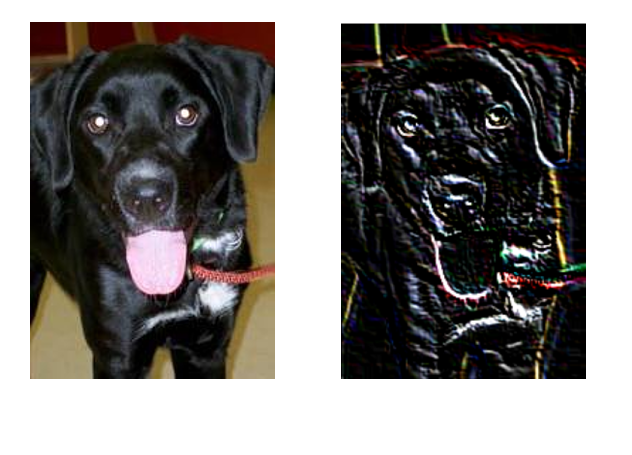
How It Works (The Math & Code)
This effect is achieved in two distinct steps using Python and OpenCV: Spatial Convolution and Colour Channel Swapping.
1. The Custom Convolution Kernel
First, a mathematical matrix (a kernel) is applied to every pixel in the video using cv2.filter2D. This specific 3x3 kernel looks like this:
[ -2, 0, 2 ]
[ -2, -2, -1 ]
This is a custom directional gradient filter. Because the top-right values are positive and the bottom-left values are negative, it highlights diagonal changes in light. Flat areas (like a clear sky) sum to zero (turning black), while edges get highlighted with an embossed, shadowy depth.
2. The Colour Channel Swap
Digital video uses three color channels: Red, Green, and Blue. OpenCV naturally reads videos in BGR format. By forcefully converting the processed frame to RGB using cv2.cvtColor, we swap the Red and Blue data. A warm, red sunset instantly becomes a cold, unnatural blue, cementing the "ghostly" atmosphere.
Developer Tutorial: Build the Ghost Filter Locally
If you are a developer or computer vision student and want to apply this exact effect to massive video files, you can easily build this pipeline locally using Python.
Prerequisites
You will need Python installed on your machine along with the OpenCV and NumPy libraries. Install them via your terminal:
The Python Implementation
Below is the complete script to read an input video frame-by-frame, apply the custom spatial convolution matrix, swap the colour channels, and write the result to a new `.mp4` file.
Performance Considerations
Be aware that applying cv2.filter2D to high-resolution video is incredibly CPU-intensive. A standard 1080p video running at 60 frames per second requires the CPU to execute the matrix multiplication on over 2 million pixels, 60 times every single second. If you lack a dedicated GPU for hardware acceleration, processing a 5-minute video locally can take significant time.
If you just want a quick preview or don't want to set up a local Python environment, you can always scroll back up and use the live, server-side visualizer for free!
Real-World Applications
- Horror Aesthetics: Perfect for Halloween edits, short horror films or spooky transitions.
- Music Videos: Add a dark, alternative or grunge look to specific beats.
- Surreal Art: Create abstract, metallic-looking dream sequences from ordinary footage.
- Gaming Montages: Use as a "death screen" or negative status effect visual.
Frequently Asked Questions (FAQ)
Q: Why do the colours look completely wrong?
That is the intended "Ghost" effect! The algorithm intentionally swaps the Red and Blue colour channels to create an unnatural, cold and spectral atmosphere.
Q: Why is my video mostly gray/black?
The mathematical kernel removes "flat" colours and only keeps edges. If your video is blurry or lacks contrast, the algorithm won't find many edges to highlight.
Q: Is my uploaded video safe?
Yes. Your video is processed in temporary memory and deleted immediately after conversion.