What is Harris Corner Detection?
Harris Corner Detection is a fundamental technique in Computer Vision used to extract features from an image. While humans easily recognize corners (like the corner of a table or a building), computers see them as mathematical points where intensity changes significantly in two directions. Unlike edge detection (which finds lines), corner detection finds points of interest that are invariant to rotation, scale, and illumination. This makes them perfect for tasks like image stitching (panoramas) and object tracking.
Why Use Corner Detection?
- Feature Tracking: Identify stable points that can be tracked across video frames.
- Image Stitching: Find matching points between two overlapping photos to create panoramas.
- 3D Reconstruction: Help map 2D images into 3D space by identifying key structural points.
Example Image
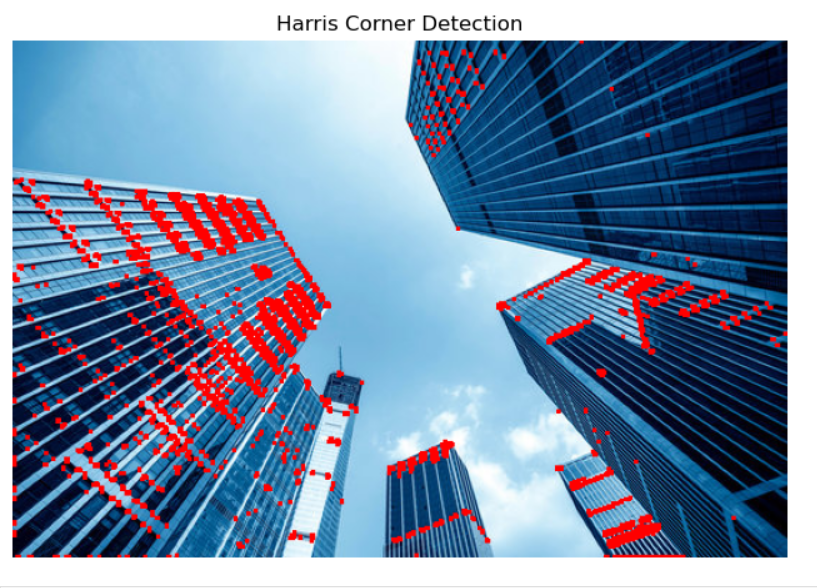
How It Works (Simple Explanation)
Imagine placing a small window over a flat region of an image (like a clear sky). If you move the window, the pixels don't change much. If you place it over an edge, moving it along the edge causes no change, but moving perpendicular causes a change. However, if you place the window over a corner, shifting it in any direction results in a large change in intensity. This "large change in all directions" is how the algorithm spots a corner.
The Mathematics Behind Harris Corners
The algorithm looks for the variation in intensity for a displacement (u, v). This is mathematically approximated using a second-moment matrix M (also called the Structure Tensor):
The matrix M is derived from image derivatives (gradients) in the x and y directions:
[ IxIy Iy2 ]
To decide if a point is a corner, we calculate a Response Score (R) based on the eigenvalues (λ₁, λ₂) of M:
Here, det(M) = λ₁λ₂ and trace(M) = λ₁ + λ₂.
If R is large and positive, the region is a corner. If R is negative, it is an edge. If R is small, it is a flat region.
Deep Dive into the Code
See how we implement the Harris Corner Response equation using Python's OpenCV backend.
View Algorithm Docs →Quick Tips for Parameters
- Block Size: The size of the neighbourhood considered for corner detection. Larger blocks smooth out noise but might miss fine corners.
- K-Size (Sobel): The aperture parameter for the Sobel derivative. Typically 3 or 5.
- Threshold: Controls sensitivity. A lower threshold detects more points (including weak corners), while a high threshold only keeps the sharpest corners.
- Corner Colour: Use the custom colour picker to contrast the markers against your specific image background.